

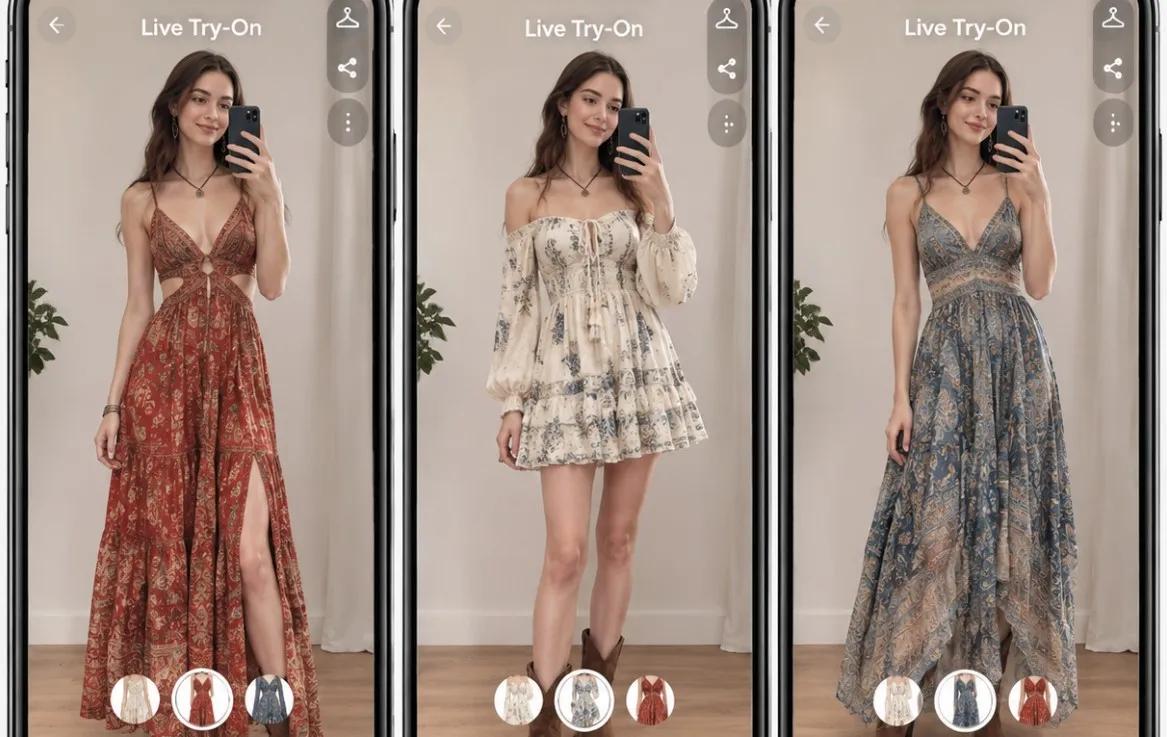
Shopping for clothes online offers convenience, endless choices, and access to fashion brands worldwide. However, one common challenge remains: how do you know whether an outfit will look good on you before placing an order? Product photos and size charts provide useful information, but they cannot fully reproduce the experience of standing in front of a mirror and trying on clothes.
Fortunately, AI and augmented reality (AR) technologies are changing the way people shop for fashion. With clothes changer AI tools, shoppers can preview different outfits using a photo or live camera feed without visiting a physical fitting room. If you want to know how to try on clothes online, this guide covers practical methods, the technology behind virtual fitting, and how to get more realistic results.
Why Is It Difficult to Choose Clothes When Shopping Online?
Online clothing stores provide product images, descriptions, and size guides. However, these resources do not always answer the questions shoppers care about most.
Some common challenges include:
Uncertain appearance: A garment may look different on a model than it does on your own body.
Size and fit concerns: Size charts provide measurements, but they cannot fully show how clothing drapes or fits different body shapes.
Color and material differences: Screen settings, lighting, and product photography can affect how fabric colors and textures appear.
Limited outfit visualization: Shoppers may struggle to imagine how different clothing items look together.
How to Try on Clothes Online: 3 Practical Methods
There are several ways to preview clothing before buying it online. The best approach depends on how realistic and interactive you want the experience to be.
Method 1. Use an AI Clothes Changer
An AI clothes changer is one of the easiest ways to try different outfits online. Instead of physically changing clothes, you upload a photo of yourself and select a garment to generate a preview.
This method is particularly useful when you want to experiment with different clothing styles, colors, and designs without taking multiple photos.
For example, you can upload a picture of yourself and test how a formal dress, casual outfit, or oversized jacket might look on you. Some tools also support different garment categories, making it easier to explore complete outfit combinations.
Method 2. Try on Clothes with a Live Camera
If you prefer an interactive fitting experience, live virtual try-on is another option. Unlike photo-based tools, live try-on uses your device's camera to capture your movements and display clothing on your body in real time. AI-powered body tracking identifies key body positions, while the rendering engine adjusts the garment's appearance as you move.
You can switch between different garments without repeatedly uploading photos or changing clothes. Turning around or changing your posture also provides additional perspectives. Live try-on is especially useful for shoppers who want a more interactive experience when exploring dresses, tops, jackets, and other apparel.
Method 3. Use an Online Virtual Fitting Room
Some fashion retailers provide virtual fitting rooms directly on their websites or product pages. These experiences allow shoppers to preview selected products without leaving the online store. Depending on the technology, a virtual fitting room may use AI-generated images, real-time camera tracking, or 3D garment models.
For example, a shopper browsing a clothing product page might click a virtual try-on button, upload a photo, and preview the selected garment.
This approach is convenient because shoppers do not need to search for a separate tool or manually upload product images from different websites. However, the available features depend on the retailer and its virtual try-on provider.
Try Kivisense AI Virtual Try-On for a More Convenient Clothing Experience
If you want to explore different outfits without visiting a physical fitting room, Kivisense offers AI-powered and AR-based virtual try-on experiences for clothing and other fashion products.
Its clothing try-on solution supports two main approaches: photo-based AI try-on and real-time live try-on.
AI Photo Try-On: Upload a photo of yourself and a clothing image to generate a preview of the selected outfit. This is useful for experimenting with different styles and visualizing new looks.
Live Try-On: Activate your camera and select clothing items to see them on your body in real time. AI-powered body tracking follows your movements, creating a more interactive fitting experience.
Kivisense also focuses on realistic clothing visualization. Its rendering technology is designed to reproduce fabric textures and material details, including silk, cotton, and knitwear.
How to Use Kivisense AI Clothes Changer
Getting started with the cloth changer AI is straightforward. You can choose between photo and live try-on modes according to your preferences.
Step 1. Choose Your Try-On Mode
Open the AI clothes changer and select either photo try-on or live try-on. Upload a picture of yourself if you prefer the photo option, or activate your camera for a real-time experience.
Step 2. Select Your Clothing
Choose an outfit from the available samples or upload a clothing image. You can explore different garments to see how various styles look.
Step 3. Preview and Compare Your Outfits
Let the system process your selection and display the virtual try-on result. Switch between different clothing options to compare looks and find your preferred style.
New users can also explore the free trial, which includes two photo try-ons or 30 seconds of live try-on.
How to Get More Realistic Virtual Try-On Results
Virtual try-on technology has improved significantly, but the quality of the results still depends on several factors. Follow these tips to get better previews.
1. Choose a Clear Photo
If you are using photo-based try-on, upload a high-resolution image with good lighting. Make sure your body is visible and not hidden behind other objects.
2. Select Suitable Clothing Images
Use product images that clearly show the garment's shape, color, and details. Images with minimal obstruction generally provide better visual references.
3. Pay Attention to Fabric Details
Different materials behave differently. Silk, cotton, denim, and knitwear have distinct textures and draping characteristics. Choose a tool that supports realistic fabric rendering if these details matter to your decision.
4. Try Multiple Styles and Colors
Do not rely on a single preview. Compare several clothing options to understand which styles and colors complement your appearance.
5. Check the Size Chart Separately
Virtual try-on primarily helps visualize appearance. It does not necessarily guarantee accurate garment measurements or physical fit. Always check the retailer's size chart, product measurements, and return policy before purchasing.
Conclusion
Trying on clothes online no longer has to mean relying entirely on product photos and size charts. AI photo try-on, live camera experiences, and virtual fitting rooms offer practical ways to preview outfits before making a purchase. Whether you want to experiment with new fashion styles or make online clothing shopping more convenient, virtual try-on technology brings the fitting room closer to your screen.