Have you noticed how easy it feels to write on Medium? When you click “New Story,” you see a clean, simple space that helps you focus on writing.
Educational platforms can do something similar by giving students an easy HTML editor that works for different kinds of assignments, from short essays to detailed lab reports.
Of course, the challenge for EdTech teams is balance: how do you give students enough structure to help them start writing, without making them feel restricted? The solution is custom content templates, which offer helpful outlines but still let students write freely.
In this article, we'll see how to build smart content templates using an easy HTML editor, with code examples you can use in your own platform.
Key Takeaways
- Templates give students a clear starting point and help them organise their ideas without needing to think about layout.
- An easy HTML editor with a custom setup can provide the right outline for each assignment type.
- Built-in sections like essay outlines or lab report headings make academic writing easier to follow.
- Reusable templates let teachers create and share layouts without needing to write code.
- A good setup guides students without making the editor feel strict or limiting.
Now that you know what templates can offer, let's look at why they're so valuable in educational platforms.
Why Educational Platforms Need Template-Based Writing Tools
Many students struggle when they're asked to write on a blank page. Traditional word processors often make this even harder with too many buttons, menus, and formatting choices.
According to cognitive load theory, reducing unnecessary mental effort helps students focus on the actual writing instead of getting stuck on structure or layout.
This is something Medium does incredibly well. Its editor removes distractions and gives writers a clean space with smart defaults.
Educational platforms can build on that idea by giving students templates made for each subject. These templates guide students on structure in a simple, gentle way while they write.
Once you understand why templates help, the next step is learning how to build one. Let's start with one of the most common academic formats.
Building Your First Custom Template
Let's start with a simple example: the classic five-paragraph essay. Instead of giving students a blank page, we can use a lightweight HTML editor like Froala to load a ready-made outline that they can edit and build on right away.
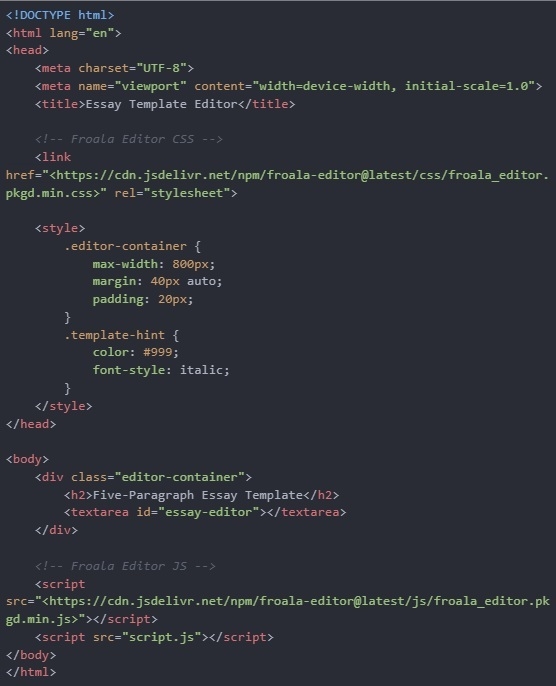
Step 1: Create the HTML Structure
This part sets up the page, loads Froala's editor styles, and prepares the area where students will write.
Step 2: Add the JavaScript Logic
Create a file called script.js and add the code to it:
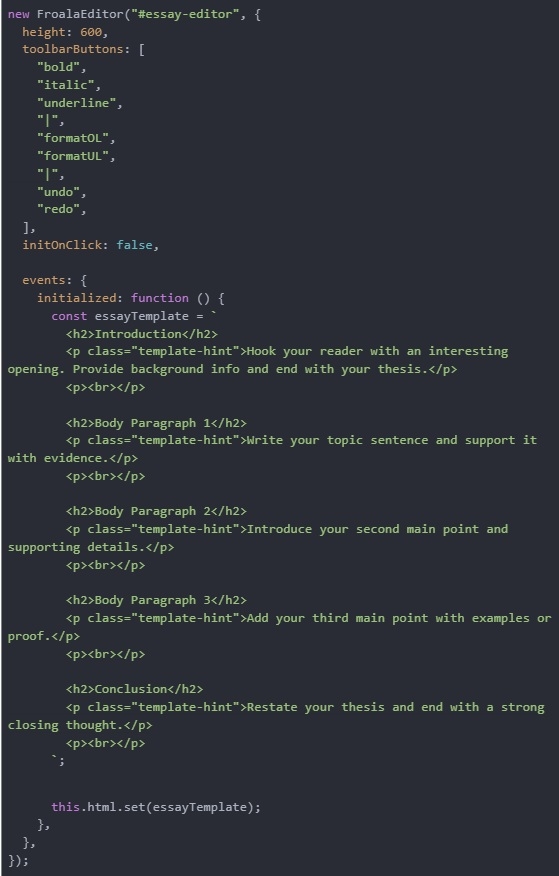
What this code does:
- Creates a Froala editor on the <textarea id="essay-editor">.
- Sets the editor height to 600px for a comfortable writing area.
- Adds basic toolbar buttons like bold, italic, underline, lists, undo, and redo.
- Disables click-to-activate, so the editor loads fully right away.
- Waits until Froala is fully ready using the initialized event.
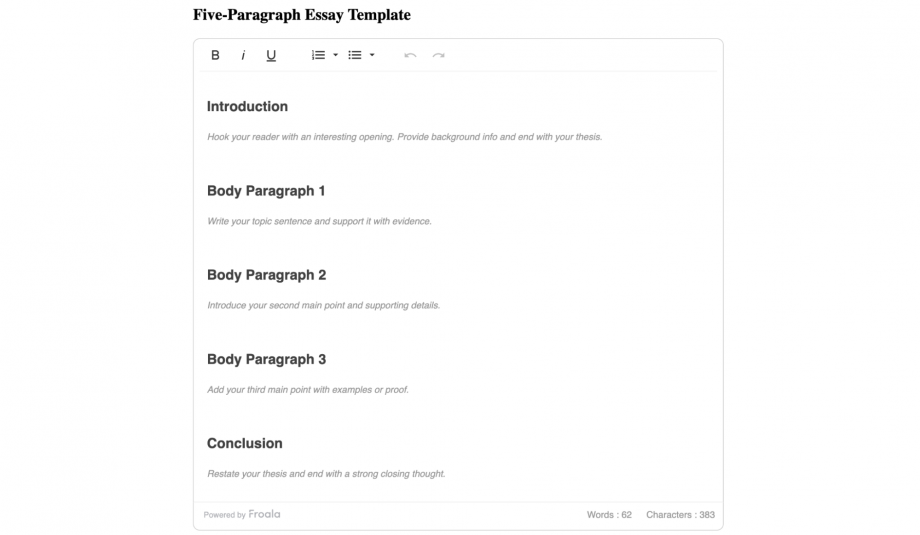
- Loads a five-paragraph essay template (Introduction, 3 Body Paragraphs, Conclusion).
- Inserts helpful hints under each heading to guide students as they write.
- Auto-fills the editor with this template so students don't start from a blank page.
Once you've created simple templates like the five-paragraph essay, you can move on to more structured assignments, for example, lab reports. They follow a very clear format, but many students aren't confident about what to include in each section.
To help with that, you can load a full lab-report layout directly into the editor.
Lab Report Template with Custom Sections
Here's an example of how to set up a lab report template:
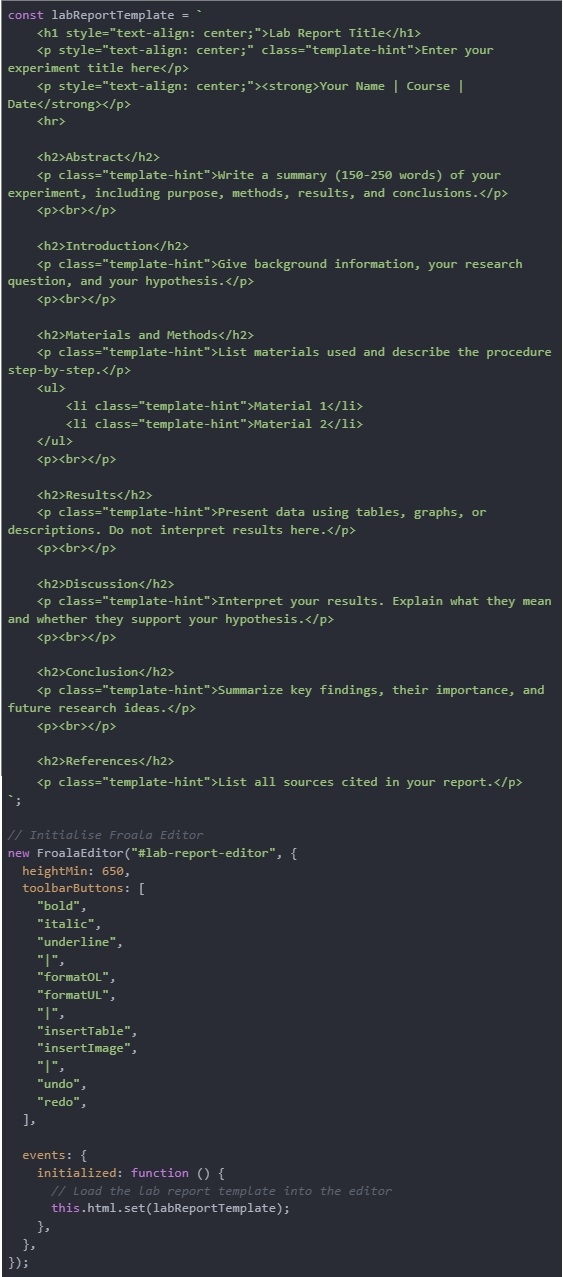
What this code does:
- Loads Froala Editor on the #lab-report-editor textarea.
- Adds a full lab-report structure (title, abstract, methods, results, etc.).
- Shows helpful writing hints under each section to guide students.
- Sets editor tools like bold/italic, lists, tables, images, undo/redo.
- Inserts the template automatically as soon as the editor initialises.
- Gives students a ready-made layout they can edit freely instead of starting from a blank page.
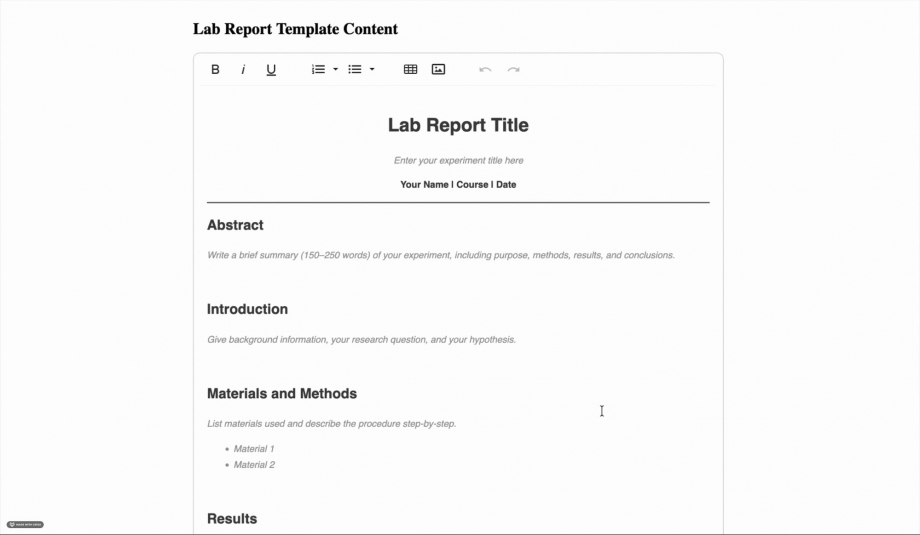
This template includes all standard lab report sections with clear guidance for each. The hints show students exactly what to write in every part, following scientific writing best practices.
Now that you've seen how individual templates work, the next step is making them easy for teachers to manage. Instead of relying on developers every time they need a new layout, teachers should be able to create, save, and reuse templates on their own.
Creating a Template Management System
To make templates truly useful, teachers need a simple way to create, save, and reuse them, without writing any code.
A template manager helps you do exactly that.
Here's a simple example you can add to your project.
Get the complete code from here!
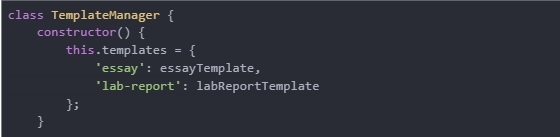
Step 1: Create a Template Manager Class
Start by building a class that stores all available templates, like the essay and lab report layouts.
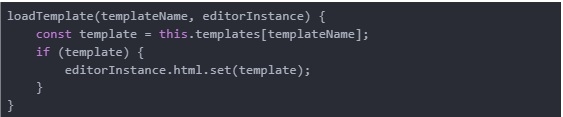
Step 2: Add a Method to Load Templates into the Editor
This method takes a template name and inserts the matching template directly into the Froala editor.
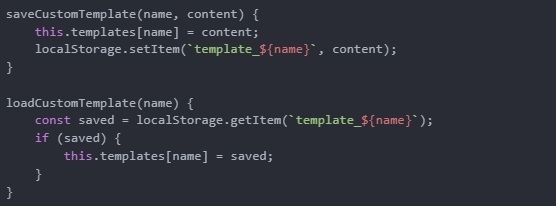
Step 3: Allow Teachers to Create and Save Their Own Templates
These methods let teachers create their own templates and store them in localStorage, making the system easy to personalise.
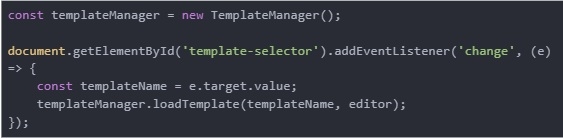
Step 4: Connect the Template Manager to a Dropdown
When a teacher selects a template from the dropdown, it loads instantly into the editor.
Step 5: Add a “Save Template” Button
This button lets teachers save the current editor content as a custom template.

What this system lets teachers do:
- Choose from built-in templates (essay, lab report…).
- Save their own reusable templates.
- Load any template instantly into the editor.
- Personalise templates for any subject or grade level.
- Use the easy HTML editor for any subject or assignment type.
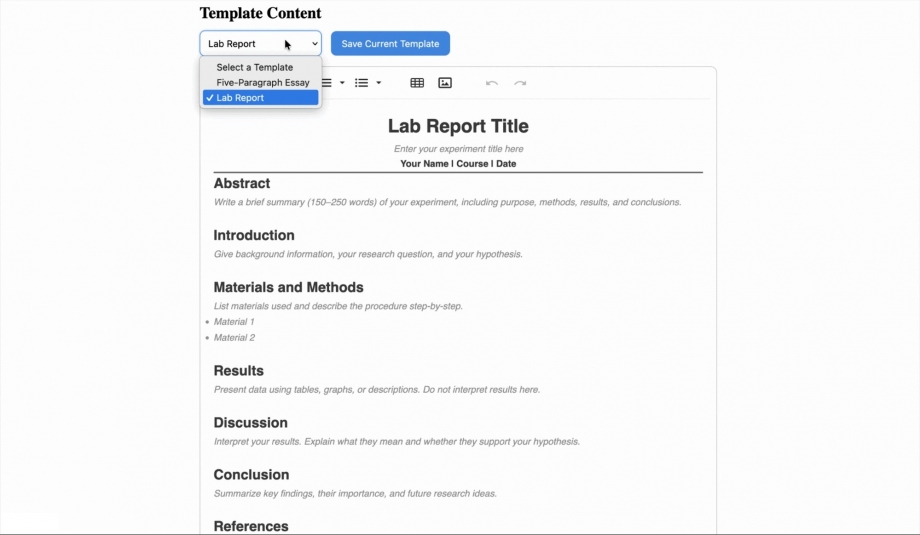
With these steps, the editor becomes flexible, customisable, and teacher-friendly, which makes it useful across different classes and assignment types.
How Product Managers Can Use This Approach
This template system isn't just helpful only for teachers and developers; it's also helpful for product managers. It helps make writing tasks smoother and easier across the whole platform.
1. Faster Assignment Creation
Teachers don't need to redo formatting or explain the structure every time. With ready-made templates, they can build assignments in minutes instead of starting from scratch.
2. Better Experience for Students
Students don't get stuck looking at a blank page. Templates give them a clear starting point, reduce confusion, and show them how to structure their writing.
3. Fewer Support Questions
Because templates explain where each section goes, students ask fewer things like, “Where do I put the hypothesis?” or “How do I end the report?” This reduces extra work for teachers and support teams.
Best Practices for Educational Content Templates
Here are some tips to help you create templates that guide students without getting in their way:
1. Make Hints Easy to Remove
Students should be able to easily replace hint text without frustration. Use light grey or italic text so they're clear but not distracting. As students start typing, the hints should fade or disappear naturally.
2. Give Structure, But Don't Force It
Never force students to use every section. They should be able to delete unnecessary parts or add new sections freely.s whenever they want.
3. Add Small Writing Tips in the Hints
Use hint text to give quick writing advice, like how to start a paragraph or what to include in a thesis. This helps students learn while they write.
4. Adjust Templates for Different Grade Levels
Younger students need more guidance, while older students need more freedom. Make your hints simpler for kids and more detailed for high-school or college writers.
5. Let Teachers Share Templates
According to Schmitz et al. (2025), collaboration among educators improves learning outcomes. Let teachers share successful templates with colleagues.
6. Handle Content Sanitization
Sanitize all user-generated HTML on the server to prevent XSS, since client-side cleaning isn't enough. OWASP also recommends validating all untrusted input.
Common Pitfalls to Avoid
Here are a few things that can make content templates frustrating instead of helpful:
1. Making Templates Too Restrictive
Templates shouldn't feel like worksheets. If students can't freely edit or rearrange sections, the template becomes limiting and discouraging. It's important to keep the structure flexible so students can shape it to fit their ideas.
2. Overcomplicating the Interface
If the editor has too many buttons or menu options, students may feel overwhelmed. A simple toolbar with basic formatting tools, like bold, italic, lists, and undo/redo, is usually enough. Extra features can stay hidden unless someone needs them.
3. Ignoring Mobile Users
Many students write assignments on their phones or tablets. If templates don't display well on small screens, the writing experience becomes difficult. Always test templates on mobile devices to make sure everything is easy to use and tap.
4. Forgetting Accessibility
Some students rely on screen readers or assistive tools. If headings, hints, or sections aren't built with accessible HTML, these students may not be able to use the template properly. Using clear, semantic HTML helps make the editor inclusive for everyone.
Conclusion
Building custom content templates with an easy HTML editor can turn a confusing educational platform into a helpful writing tool.
Just like Medium gives writers a clean layout that gently guides them, these templates can help students get started while still letting them be creative.
When you use them well, these templates can make writing less stressful. They reduce mental effort, teach students how to structure their work, and let them focus on their ideas instead of worrying about formatting.
Whether you're building an LMS, a homework tool, or any learning app, adding smart templates can make a big difference for both students and teachers.
You can start with one or two basic templates, test them with real students and teachers, and improve them based on what they say. The most effective education tools come from real classroom needs, not from assuming what might work in theory.
About the Author
Shefali Jangid is a web developer, technical writer, and content creator with a love for building intuitive tools and resources for developers.
She writes about web development, shares practical coding tips on her blog shefali.dev, and creates projects that make developers' lives easier.